Wednesday, July 23, 2014

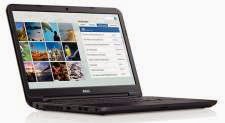
Fantastic value DELL Inspiron 15 laptop

Having written about a really cheap desktop from Acer recently, this time it is a laptop. DELL are offering an Inspiron 15 for just £179 including VAT, shipping, and a years warranty. With a discount code this can be further reduced to £166.
It is a fairly bare configuration of course:
- Intel Celeron Dual Core N2830 CPU 2.17GHz (turbo up to 2.4GHz)
- 4GB Single Channel DDR3 1600MHz (4GBx1)
- 500GB 5,400rpm SATA Hard Drive
- 4-in-1 Media Card (SD/SDHC/MS/MS Pro)
- Intel HD Graphics
- 15.6 inch LED Backlit Display (1366 x 768)
- Microsoft Windows 8.1 with Bing

So, no CD or DVD optical drive, Bluetooth or Ethernet. Still great for the price.

I ordered one yesterday and it was delivered this morning. The laptop seems well built, after setting it up and removing a lot of software c**p, is fine and reasonably responsive. As I repair PCs for a living, I see a LOT of slow laptops and this doesn't seem to be one of them. It processes most web surfing, emails, photo editing (with free Paint.net), word processing, etc. applications just fine. I ran a couple of Internet games on it as well (such as Forge of Empires) and these worked well too.

For £166, I'm really impressed. Fine for home use, students, old folks, etc. I'll probably keep it myself as a spare. Might fit a small 128Gb SSD to make it even better.

Monday, June 30, 2014

Chieftec Purple Dragon died

After many years of faithful service my huge, heavy, mega-tower Chieftec Purple Dragon case has gone. It blew up in spectacular fashion when the old PSU expired with a loud bang. As I sit quite near it, I had massive fright. Luckily, further examination and testing revealed that the MSi motherboard, overclocked AMD Phenom II X3 720, memory and hard drives had survived.

As I thought that it would be difficult to replace the PSU with the extra long leads to reach to the bottom of the case and I could hardly lift it any more, it was better being rehoused and scrap the power-hungry nVidia 9600GSO graphics, the IDE RAID hard disk drive array and multiple optical drives. So the remains were re-housed in a modern, light case with a fast, SATA hard drive and a new nVidia GT610 graphics card. Amazingly Windows Vista re-activated and we are back on the road again.

The empty Purple Dragon case was thrown in the iron and steel skip at the local dump. It served me well for many years.

Neat NAS

Those of you that have follow my blog know that I'm a big supporter of Windows Home Server. Unfortunately this brilliant software is doomed and the Windows Server 2003 which is the basis for WHS version 1 is now out of support. I still run WHS v1 on a full tower DELL server as the centre of my home network. However I only turn it on when needed as it is too expensive with three hard disk drives, a dual core CPU and lots of fans to run 24/7. The shared folders are safely split across the three drives and when one failed it was easy to replace and recover without any important data loss.


So I was looking for a small, energy efficient NAS to run all the time and provide:
- my music library for the Sonos wireless music system
- recent photos to show on my Nexus tablet
- backup storage for client's computers before I start working on them
- shared marketing documents that can be accessed remotely.

Data protection, resilience and performance were lower priorities than availability. So a single disk NAS seemed to fit the requirements. The WD MyCloud 2Tb for £110 seemed a good price being not that much more expensive than a USB external hard drive. Interestingly, the dual bay/drive version was over twice the price.

Setup wasn't easy as to start with the NAS not discoverable on my LAN. A firmware upgrade and some extra help from the excellent WD support line fixed any problems. The NAS is now mapped as an extra drive on all my systems. Remote access is not easy as it relies on Java which I've removed from all systems, and also recommend that my clients do this too. Another problem was that Windows 7 Home will not allow backup to a network drive. The Professional and Ultimate versions do however. Microsoft shoots itself in the foot yet again as home users will not buy backup software.

This certainly is a neat bit of kit providing almost exactly what I wanted. I haven't tried the 'snapshot' backup service yet as this is isn't a priority.

Sunday, May 18, 2014

Cheapest hardware ever

I've just bought my cheapest complete PC hardware ever for just under £130. Ebuyer are offering the Acer Aspire XC-603 without operating system for just £129.99 including free postage. This neat small form factor PC has an Intel latest technology, low-power Quad core Celeron J1900 running at 2GHz nominally and 2.4GHz in turbo mode. Plus 4Gb DDR3 memory, 500Gb hard disk drive, DVD writer, card reader, and four USB 2 and one USB 3 port. All assembled in one very nice looking case with a brushed aluminium effect front panel. It runs very quietly and come with a years warranty too.

Follow the instructions to re-flash the BIOS and then simply load Windows 7 Home Premium for a neat PC that costs less than £200. Or load Windows 8.1 directly if you are feeling adventurous. Either way you end up with a responsive computer which can easily handle Internet web surfing and emails, word processing and digital photo editing for home or office use. The quad core Celeron if fine for these tasks and clicking on a desktop icon always opens a new window quickly. You can expand the memory for the future to 8Gb if needed. Substituting or adding a SSD would also increase performance.

Well done Acer! In these days of smartphones and tablets it is good to see the desktop computer hitting back.

Sunday, April 20, 2014

Ubuntu 14.04 LTS replacement for Windows XP?


Every couple of years I download the latest version of Ubuntu Linux and try it out. Generally I'm disappointed in its installation, operation, user interface and software applications.

So what has changed?


Firstly a new LTS (Long Term Support) version called Trusty Tahr with a generally liked new user interface and the end of support for good, old Windows XP. I downloaded the Desktop version ISO and installed it on a DELL Optiplex GX520 compact tower the a 3GHz Intel Pentium D and 2Gb memory; i.e. a typical ten year old computer. Firstly the installation went extremely smoothly and for once I didn't have to use the command line/terminal window at all. It even came pre-loaded with the latest versions of useful applications like LibreOffice, Firefox, Thunderbird and a neat photo management application called Shotwell.

What I was left with a modern looking desktop interface that appears to be better and less scary than Windows 8 Metro and is easier to use. I was easily able to add my preferred Google Chrome browser. I even played Forge of Empires on it.

I'm getting a lot of concerned customers calling me about the expiration of Windows XP. After going through the usual options of a new Windows 8 PC, not worth upgrading a five year old computer, buying a reconditioned one, etc. this seems a great value solution to just load this onto their old hardware. It is another option that can be considered. A lot of my customers just want to surf the web, read emails, load digital photos, etc. Ubuntu 14.04 is a really good way of doing just this.

So the Linux desktop has finally found a reason to exist. A great piece of software and an opportunity. I used to program Unix System V for a living so the command line interface is no stranger to me but I just hate using it to do simple things like install applications.  My only concern is why did they have to put the windows close button on the left like a Mac?  95% of the world's users expect to see it on the right.

Going to sleep

I've never been a great fan of sleeping or hibernating computers. Traditionally it took awhile to happen, then a longer while to come back on again, then a wait to restore the Internet connection and then the applications would often crash. Hardly worth the hassle and the power savings made were dubious.

Things have changed though, I've started to use it more often both on demand when I've finished using the computer and after quarter-of-an-hour when I just walk away. The difference is modern hardware and software has improved the response times. On systems with SSD hard drives the response time is down to a couple of seconds and that includes the Internet re-connection and Windows and applications seem more resilient to hibernate and sleep actions. Also modern CPU and associated hardware take much less power drain these days and power supply units are more power efficient.

In these green, energy saving times when your energy bill rises in jumps it makes more sense now to use sleep and hibernate.

Saturday, March 8, 2014

Intel Pentium G3420 improvement

A couple of posts ago, I complained that the Intel Pentium G2020 CPU was a poor performer and I preferred the Core i3. Well I gave the Pentium another chance in a low-cost build that I configured with the latest 'Haswell' Pentium G3420 processor in an MSi Socket 1150 motherboard. The processor was still cheap at £47 and the motherboard as well at just £32. The result was a considerable improvement over the previous version.

The system seemed responsive enough even without an SSD. It used 1600MHz DDR memory instead of 1300Mhz and that appeared to help the graphics performance as well as the additional 300MHz CPU clock speed increase. Benchmarks typically showed a 25% or greater performance improvement. Not bad for just £9 more. The only problem was finding the correct graphics drivers as after loading the one from the MSi CD, I couldn't update it giving an 'unrecognised device' error. Removing the original driver and installing the Windows Update version solved the problem.

So this new processor is worthy of the Pentium name and gives good bang-for-the-buck in a value engineered system.

UPDATE: Computer Shopper has confirmed my findings with the Pentium G2020 getting a benchmark score of 43 for £38 compared to the Pentium G3420 getting 52 for £47.